第11章:Decorator応用⏱️📈🔁(計測・リトライの“考え方”)
この章はね、「本体コードはなるべく触らずに」**観測(計測)と信頼性(リトライ)**を“外付け”できるようになる回だよ〜!🎀✨ つまり Decoratorで“横断的関心ごと”を外に出す練習ね🧁🧠
0) この章のゴール🎯✨
- ✅ 処理時間を測る Timing(計測)Decorator が書ける⏱️
- ✅ 失敗したら良い感じに再試行する Retry(リトライ)Decorator が書ける🔁
- ✅ ログ+計測+リトライを“重ねがけ”しても、ぐちゃぐちゃにならない🧁🎀
- ✅ 「どこまでDecoratorでやるべき?」の判断が少しできるようになる🧭🙂
1) まず大事:Decoratorパターンと「@デコレータ構文」は別物だよ🙅♀️💡
ここで扱うのは GoFのDecoratorパターン(ラップして機能を足すやつ)🎀
TypeScriptの @something みたいな 構文のdecoratorの話じゃないよ〜!混ざりがちなので注意😉
2) 計測Decorator⏱️:なにを測る?どこで測る?
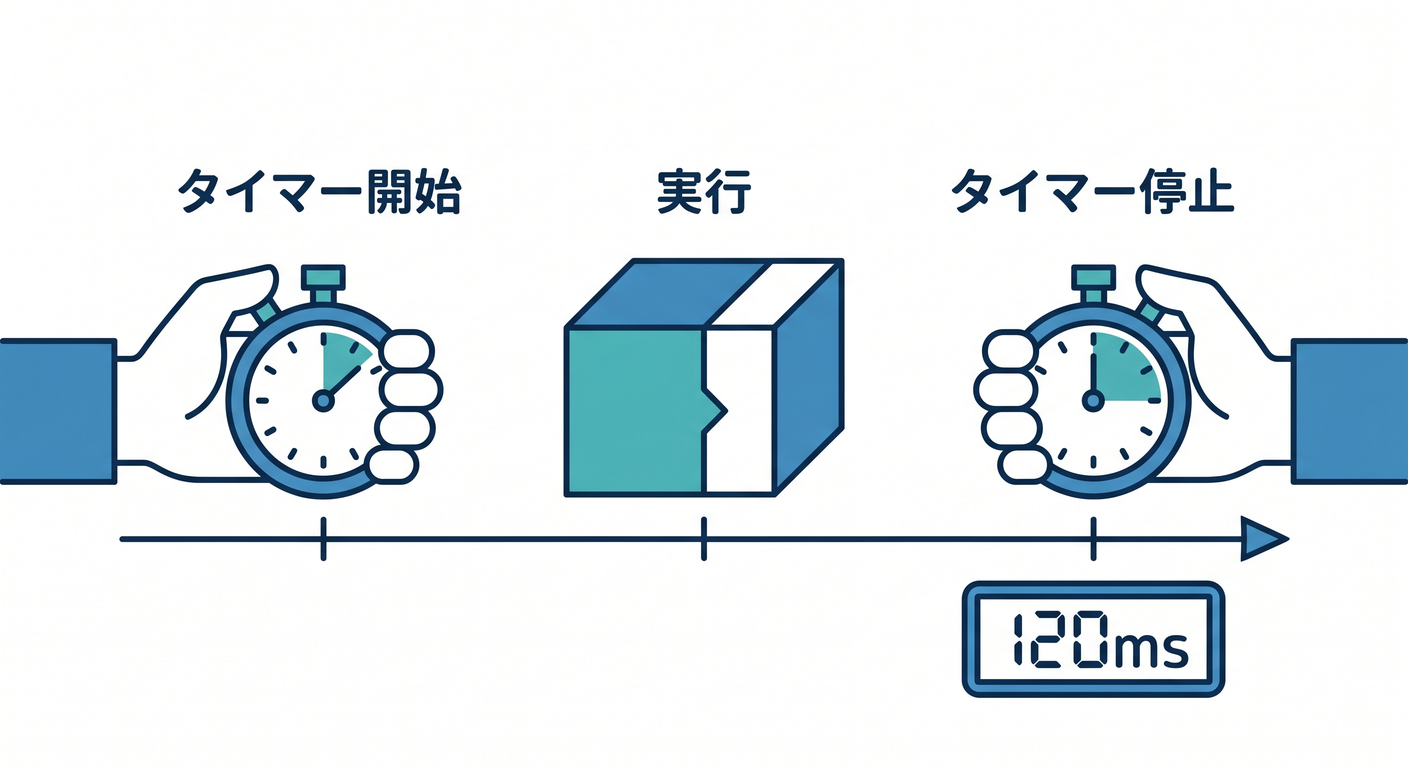
よく測るもの📌
- ⏱️ 処理時間(API呼び出し、DBアクセス、重い計算…)
- 📈 回数(何回呼ばれた?何回失敗した?)
- 😵 失敗率(成功/失敗の割合)
まずはこの章では、いちばん分かりやすい 処理時間をやるよ〜⏱️✨
performance.now() は高精度タイマーとしてWeb標準で定義されてるし、Node側にも関連APIがあるよ📏✨ (MDN Web Docs)
3) 実装してみよ:TimingDecorator(async対応)⏱️🧁
今回の“本体”インターフェース(最小)🧩
execute() だけを持つサービスとして統一しちゃうと、Decoratorが作りやすいよ✨
// src/core/Service.ts
export interface Service<Req, Res> {
  execute(req: Req): Promise<Res>;
}
ログ用(最小)📝
// src/core/Logger.ts
export interface Logger {
  info(message: string): void;
  warn(message: string): void;
  error(message: string): void;
}

export const consoleLogger: Logger = {
  info: (m) => console.log(m),
  warn: (m) => console.warn(m),
  error: (m) => console.error(m),
};
TimingDecorator本体⏱️✨
try/finally を使うと、成功でも失敗でも必ず計測ログが出せるよ〜!えらい!👏
// src/decorators/TimingDecorator.ts
import { performance } from "node:perf_hooks";
import type { Service } from "../core/Service";
import type { Logger } from "../core/Logger";

export class TimingDecorator<Req, Res> implements Service<Req, Res> {
  constructor(
    private readonly inner: Service<Req, Res>,
    private readonly name: string,
    private readonly logger: Logger,
  ) {}

  async execute(req: Req): Promise<Res> {
    const start = performance.now();
    try {
      return await this.inner.execute(req);
    } finally {
      const ms = performance.now() - start;
      this.logger.info(`⏱️ [timing] ${this.name}: ${ms.toFixed(1)}ms`);
    }
  }
}
※ node:perf_hooks はNodeのパフォーマンス計測API(Web Performance APIの一部)として提供されてるよ📚 (Node.js)
4) リトライDecorator🔁:強いけど、雑にやると事故る😱
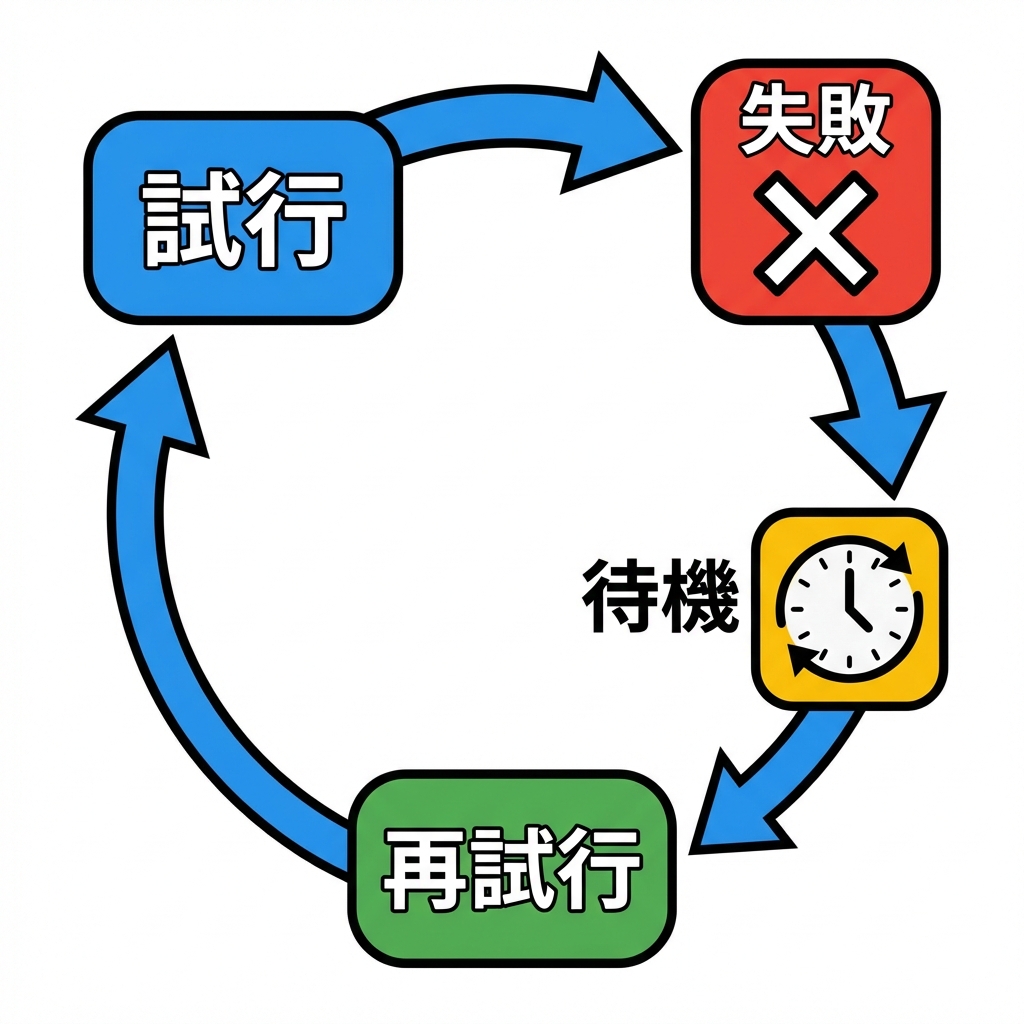
リトライって「失敗したらもう一回!」だけど、ここに落とし穴がいっぱいあるよ〜💥
4-1) 無限リトライはダメ🙅♀️♾️
- 😱 サーバーが死にかけてるのに殴り続ける
- 💸 API課金が増える
- 🔥 “リトライ嵐”で全体が落ちる(カスケード障害)
なので基本は、
- ✅ 回数上限(maxAttempts)
- ✅ 待ち時間(delay)
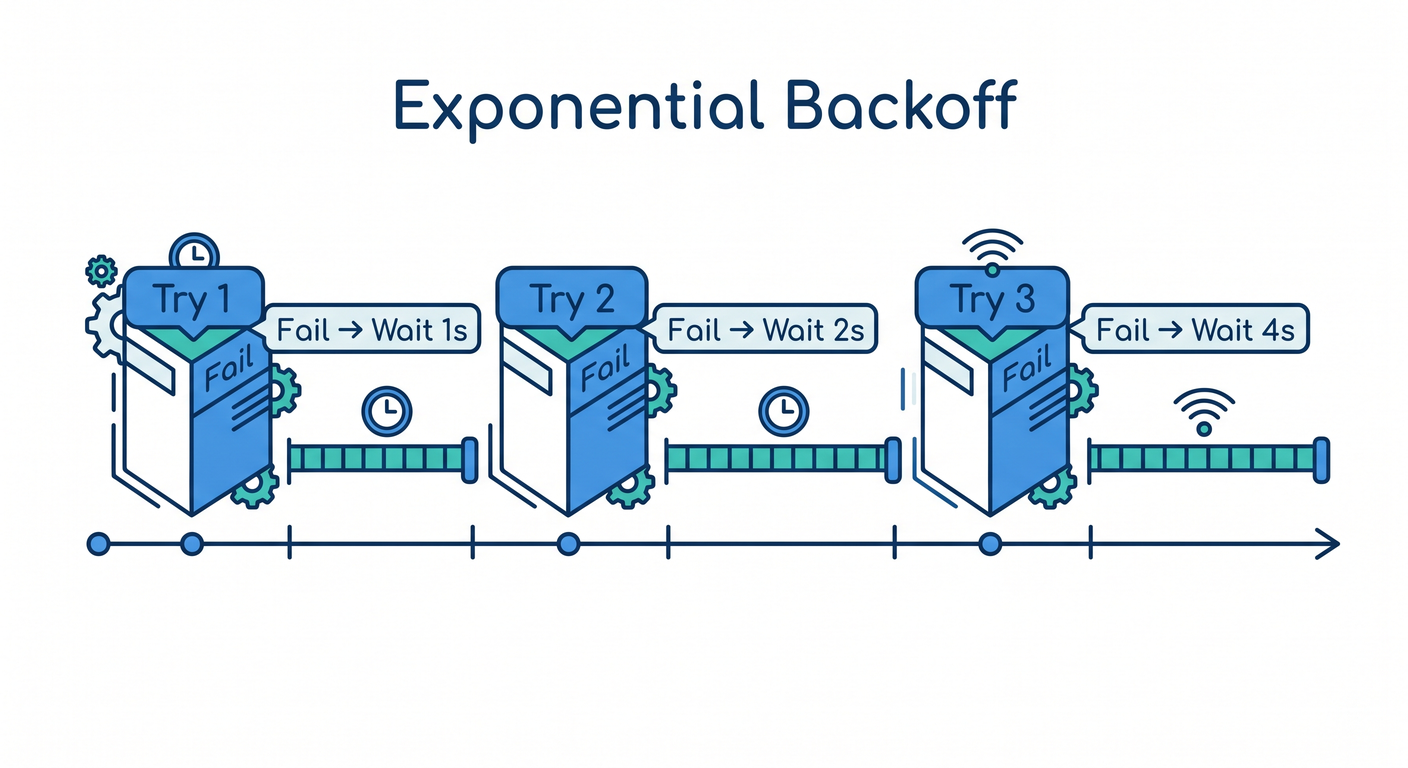
- ✅ 指数バックオフ(exponential backoff)+ジッター(jitter) をセットで考えるのが王道✨ (Amazon Web Services, Inc.)
4-2) 「どの層でリトライする?」は超重要📌
基本は スタックのどこか1箇所でリトライが推奨されることが多いよ。 あちこちでリトライすると、重複して状況が悪化しがち…😵💫 (Amazon Web Services, Inc.)
4-3) “安全にリトライできる?”(冪等性の感覚)🧠
- ✅ GET / “読み取り” は比較的リトライしやすい
- ⚠️ POST / “作成や課金” は危険(2回成功したら二重に作られる!💸)
クラウドの公式ガイドでも「idempotency criteria(冪等性)を満たすものだけ」を基本にしてるよ📚 (Google Cloud Documentation)
4-4) 429(混んでる)なら Retry-After を尊重🙏
429とか、混雑時に返ってくる Retry-After は「この秒数は待ってね」って意味だよ🕒 (MDN Web Docs)
これ無視して突っ込むと、逆にもっと制限されたりする(例:Microsoftも“尊重しよう”って言ってる)⚠️ (Microsoft Learn)
5) 実装してみよ:RetryDecorator(指数バックオフ+ジッター)🔁✨
ユーティリティ(sleep + backoff)🛌💤
// src/utils/retryUtils.ts
export function sleep(ms: number, signal?: AbortSignal): Promise<void> {
  return new Promise((resolve, reject) => {
    if (signal?.aborted) return reject(signal.reason ?? new Error("Aborted"));

    const id = setTimeout(() => {
      cleanup();
      resolve();
    }, ms);

    const onAbort = () => {
      cleanup();
      reject(signal.reason ?? new Error("Aborted"));
    };

    const cleanup = () => {
      clearTimeout(id);
      signal?.removeEventListener("abort", onAbort);
    };

    signal?.addEventListener("abort", onAbort, { once: true });
  });
}

// AWSでよく紹介される "Full Jitter" の形:0〜cap のランダムにするやつ🎲
export function calcBackoffMs(
  attempt: number,
  baseDelayMs: number,
  maxDelayMs: number,
  jitter: "full" | "none",
): number {
  const cap = Math.min(maxDelayMs, baseDelayMs * 2 ** (attempt - 1));
  if (jitter === "none") return cap;
  return Math.floor(Math.random() * cap);
}
指数バックオフ+ジッターは、リトライの“群れ”をバラけさせて混雑を悪化させにくい定番テクだよ🎲✨ (Amazon Web Services, Inc.)
RetryDecorator本体🔁
// src/decorators/RetryDecorator.ts
import type { Service } from "../core/Service";
import type { Logger } from "../core/Logger";
import { sleep, calcBackoffMs } from "../utils/retryUtils";

export type RetryOn = (error: unknown) => boolean;

export interface RetryOptions {
  maxAttempts: number;       // 例: 3
  baseDelayMs: number;       // 例: 200
  maxDelayMs: number;        // 例: 2000
  jitter: "full" | "none";   // 迷ったら "full" 🎲
  retryOn: RetryOn;          // どのエラーなら再試行する?
  signal?: AbortSignal;      // キャンセルしたい時に使う(任意)
}

export class RetryDecorator<Req, Res> implements Service<Req, Res> {
  constructor(
    private readonly inner: Service<Req, Res>,
    private readonly opt: RetryOptions,
    private readonly logger: Logger,
    private readonly name: string,
  ) {}

  async execute(req: Req): Promise<Res> {
    let attempt = 0;

    while (true) {
      if (this.opt.signal?.aborted) {
        throw this.opt.signal.reason ?? new Error("Aborted");
      }

      attempt++;

      try {
        return await this.inner.execute(req);
      } catch (e) {
        const canRetry = this.opt.retryOn(e);
        const hasNext = attempt < this.opt.maxAttempts;

        if (!canRetry || !hasNext) {
          this.logger.error(`💥 [retry] ${this.name}: give up (attempt ${attempt})`);
          throw e;
        }

        const waitMs = calcBackoffMs(
          attempt,
          this.opt.baseDelayMs,
          this.opt.maxDelayMs,
          this.opt.jitter,
        );

        this.logger.warn(
          `🔁 [retry] ${this.name}: attempt ${attempt}/${this.opt.maxAttempts} failed → wait ${waitMs}ms`,
        );

        await sleep(waitMs, this.opt.signal);
      }
    }
  }
}
6) “重ねがけ”してみる🧁🎀(ログ+計測+リトライ)
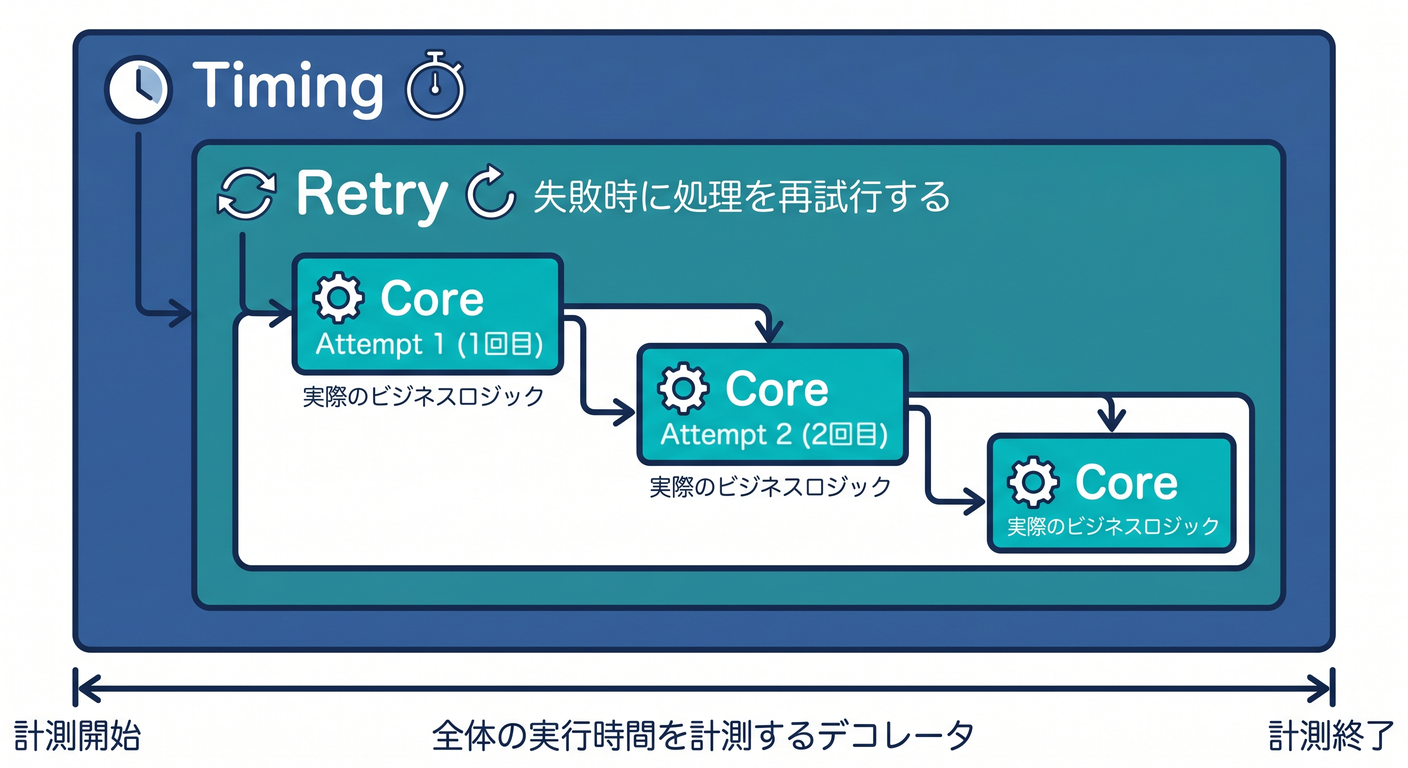
Decoratorのいいところは 組み合わせができること!✨ ただし 順番で意味が変わるから、そこだけ注意してね😉
例:
- 外側がTimingなら「リトライ込みの合計時間」を測る⏱️
- 内側がTimingなら「各試行ごとの時間」を測る⏱️⏱️
動くデモ(わざと失敗するサービス)😈
// src/demo/FlakyService.ts
import type { Service } from "../core/Service";

export class FlakyService implements Service<{ id: number }, string> {
  constructor(private failRate = 0.6) {}

  async execute(req: { id: number }): Promise<string> {
    // ちょい待つ
    await new Promise((r) => setTimeout(r, 80));

    if (Math.random() < this.failRate) {
      throw new Error("TransientError: network glitch");
    }

    return `✅ ok: ${req.id}`;
  }
}
合成(組み立て)して実行🚀
// src/index.ts
import { consoleLogger } from "./core/Logger";
import { FlakyService } from "./demo/FlakyService";
import { RetryDecorator } from "./decorators/RetryDecorator";
import { TimingDecorator } from "./decorators/TimingDecorator";

const logger = consoleLogger;

const core = new FlakyService(0.7);

const withRetry = new RetryDecorator(
  core,
  {
    maxAttempts: 4,
    baseDelayMs: 200,
    maxDelayMs: 2000,
    jitter: "full",
    retryOn: (e) => e instanceof Error && e.message.startsWith("TransientError"),
  },
  logger,
  "FlakyService",
);

// 外側で合計時間を測る⏱️(リトライ込み)
const app = new TimingDecorator(withRetry, "FlakyService (total)", logger);

  .then((res) => logger.info(`🎉 result: ${res}`))
  .catch((e) => logger.error(`😵 final error: ${(e as Error).message}`));
7) ミニ演習✍️💞(手を動かすやつ!)
演習1:Timingの位置で何が変わる?🧪⏱️
- A:
TimingDecorator(RetryDecorator(core)) - B:
RetryDecorator(TimingDecorator(core))
どっちが「合計時間」、どっちが「試行ごとの時間」になる?🤔✨
演習2:retryOn を賢くする🧠
今は message.startsWith(...) だけ。
- ✅ “一時的エラーだけ” をリトライ対象にする条件を増やしてみよ(例:timeoutっぽい文字列)🔍
演習3:429のときの待ち方を考えてみる🕒
実装は「将来の課題」でOKだけど、方針として:
Retry-Afterがあればそれを優先する …って説明できたら合格💮 (MDN Web Docs)
8) AI拡張に頼むなら🤖✨(プロンプト例)
コピペで使えるやつ置いとくね🫶
- 「
Service<Req,Res>を前提に、処理時間を計測するDecoratorをtry/finallyで作って。ログはLoggerinterfaceに合わせて」 - 「指数バックオフ+ジッターの
calcBackoffMsを実装して。full jitter の形で」 (Amazon Web Services, Inc.) - 「このRetryDecorator、無限ループや過剰リトライになってない?上限・待ち時間・対象エラーの観点でレビューして」
AIの出力チェック観点✅
- 🔁 maxAttempts ある?(無限じゃない?)
- 🕒 backoff ある?(即連打してない?)
- 🎯 retryOn が雑すぎない?(全部リトライしてない?)
- 💸 “課金/作成”系をリトライしてない?(冪等性OK?) (Google Cloud Documentation)
9) 章末ミニテスト🎓📝(5問)
- Decoratorパターンの強みを一言で言うと?🎀
try/finallyを使う理由は?⏱️- リトライに 上限 が必要な理由は?😱
- 指数バックオフ+ジッターの目的は?🎲 (Amazon Web Services, Inc.)
- 429のとき
Retry-Afterを尊重する意味は?🕒 (MDN Web Docs)
10) おまけ:本日時点の“開発まわり”小ネタ🪄(超短く)
- Node.js は v24系がActive LTS、v25系がCurrentとして更新が続いてるよ(更新日も出てる)📦 (Node.js)
- TypeScript のnpm “latest” は 5.9.3 になってるよ🧷 (npm)
- TypeScript 6.0は “橋渡し”として計画されていて、7.0(ネイティブ化)に向けた流れが公式から出てるよ🚀 (Microsoft for Developers)
(でも!この章のDecoratorパターンはTSのバージョンに左右されにくいから安心してね😊)
まとめ🎀✨
- Decoratorは **横断的関心ごと(ログ/計測/リトライ)**を“外付け”するのが得意🧁
- 計測は
try/finallyで「失敗しても測る」⏱️ - リトライは 上限+バックオフ+ジッター+対象エラーが基本セット🔁🎲 (Amazon Web Services, Inc.)
- そして「安全にリトライできる?」(冪等性)を忘れない💸⚠️ (Google Cloud Documentation)
次の第12章は「Decoratorやりすぎ問題🕳️🛑」を潰しにいく回だよ〜!
この章で作った TimingDecorator / RetryDecorator を、わざと“悪い置き方”してから直すとめっちゃ身につくよ😈➡️😇✨