第05章:「整合性」って何が一致してる状態?🧠🔍
この章でできるようになること ✅✨
- 「整合性」と言ったとき、何と何が一致している話なのかを言葉で分けられるようになる 🧩
- 一致対象を 状態(DB)/事実(イベント)/表示(画面) の3つに分解できるようになる 🧠
- わざと“ズレ”を起こして、**「画面は処理中・DBは確定」**みたいな状態を実際に作って観察できる 👀⏳
- ついでに、AIで「用語ミニ辞典」を作って貼れる 📖🤖
5.1 そもそも「整合性」って何?(ざっくり1行)📝
整合性 = “一致していてほしいもの同士”が同じ内容になってることです ✅
…なんだけど、分散っぽい世界では「一致してほしいもの」が1種類じゃないのが落とし穴 😵💫 なので、この章はまず 一致対象を3種類に分けるところからやるよ〜!🧠✨
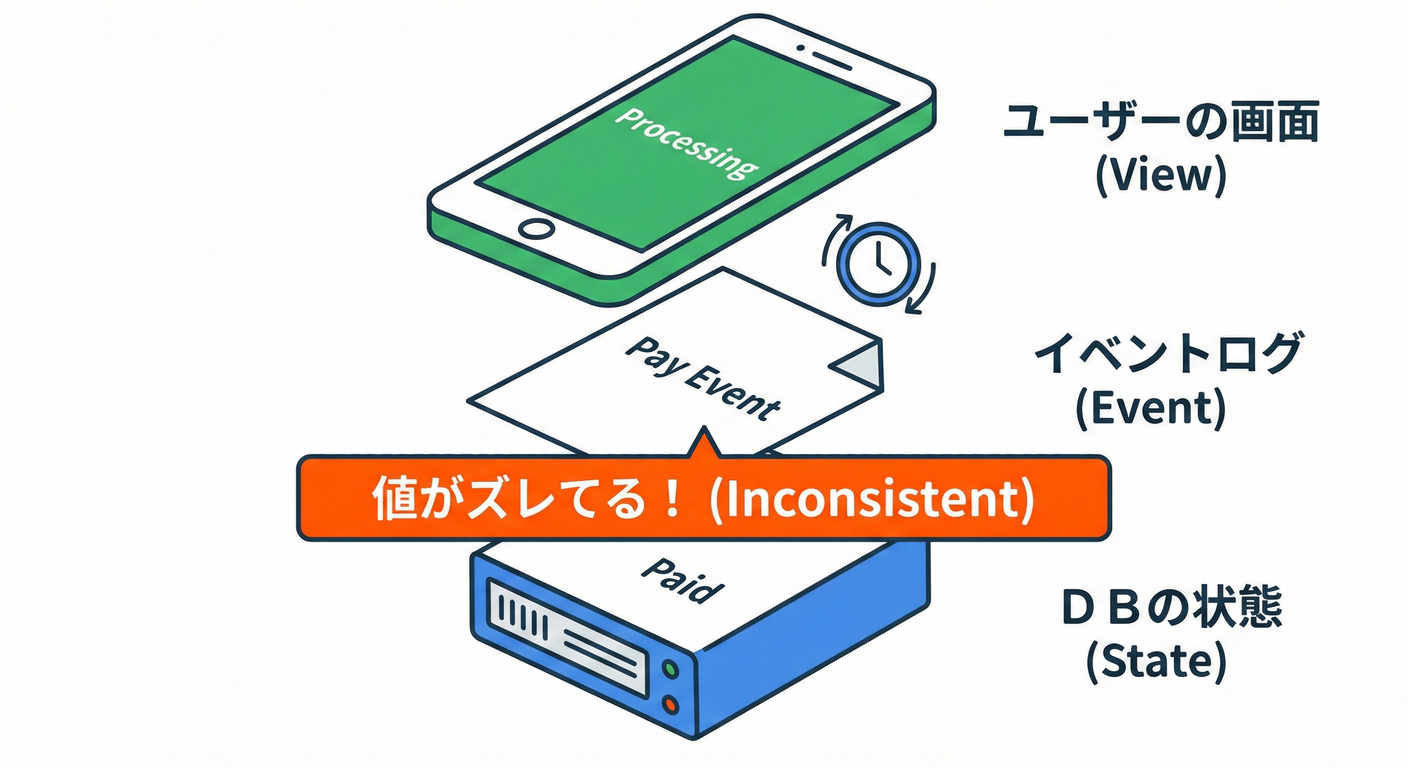
5.2 一致対象は3つある(ここが超大事)🧠🔍
① 状態(DB)🗃️
「今この注文はどんな状態?」みたいな、いま現在のスナップショット。
例:orders の status = confirmed
- 上書きされる(更新される)
- “今”を取り出すのが得意
② 事実(イベント)📨
「何が起きた?」のログ。起きたことの履歴(追加されるだけ)。
例:OrderAccepted が起きた、OrderConfirmed が起きた
- 追記が基本(消さない・直さない)
- “起きた順番”や“いつ起きたか”を残しやすい
③ 表示(画面)🖥️
ユーザーが見る「注文状況:処理中です…」みたいな 見せ方。 例:UIにはまだ「処理中」って出てる
- たいてい「状態」や「事実」から作られる(投影/集計)
- つまり 遅れてもおかしくない(むしろ遅れるのが普通)⏳
5.3 3つの関係を1枚でイメージ🗺️✨
(事実)イベント     →  (状態)DBの現在地     →  (表示)画面の見え方
 OrderAccepted         orders.status=processing     UI: 「処理中です」
 OrderConfirmed        orders.status=confirmed      UI: 「まだ処理中…」 ←ズレ!
 (少し後)                                      UI: 「確定しました!」 ←追いつく
この「ズレ」が、CAPとか最終的整合性とかの入口になるよ〜!🚪✨
(CAPの“C”は、そもそも「何が一致してるの?」を決めないと語れないのね)
5.4 ハンズオン:同じ注文で「画面は処理中・DBは確定」を作る 🧪🐢
ねらい 🎯
- 注文を作る → Workerが後で確定させる(ここまではよくある)
- DBは先に確定させる
- でも 画面用データはわざと遅らせる
- すると「画面は処理中・DBは確定」が発生する!🎉
5.4.1 使うバージョン感(2026の“今”)🧰✨
- Node.js は v24 が Active LTS(2026年1月時点) (Node.js)
- TypeScript は 5.9 がリリース済み(2025年8月リリース) (Microsoft for Developers)
- TypeScript はネイティブ移行(Project Corsa / TS7系)の進捗も公式が継続発信中(将来の高速化の流れ) (Microsoft for Developers)
- VS Code は 2026年1月に 1.108 系のリリースノートが出てるよ (Visual Studio Code)
(ここは“用語の理解”が主役なので、細かい差は気にしなくてOKだよ😊)
5.4.2 データ置き場(3種類を分ける)📁
ルートに data/ を作って、3種類を分けて保存するよ〜!
data/orders.json…… 状態(DB役) 🗃️data/events.jsonl…… 事実(イベント役) 📨data/orderViews.json…… 表示(画面役) 🖥️
初期化用に、まず空ファイルを作る:
mkdir data

'{}' | Out-File -Encoding utf8 data/orders.json
'{}' | Out-File -Encoding utf8 data/orderViews.json
''   | Out-File -Encoding utf8 data/events.jsonl
5.4.3 依存関係の追加(API用)📦
npm i express nanoid
npm i -D typescript tsx @types/express
(tsx はTSをサクッと実行するランナーだよ🚀)
5.4.4 API(注文を作って、イベントを追記する)🛒📨
apps/api/src/index.ts(例)
import express from "express";
import { nanoid } from "nanoid";
import { appendFile, readFile, writeFile } from "node:fs/promises";
import path from "node:path";

type OrderStatus = "processing" | "confirmed" | "failed";

type Order = {
  orderId: string;
  status: OrderStatus;
  createdAt: string;
  updatedAt: string;
};

type OrderView = {
  orderId: string;
  uiStatus: "処理中" | "確定" | "失敗";
  message: string;
  updatedAt: string;
};

type Event = {
  eventId: string;
  type: "OrderAccepted" | "OrderConfirmed" | "OrderFailed";
  orderId: string;
  at: string;
  traceId: string;
};

const app = express();
app.use(express.json());

const DATA_DIR = path.join(process.cwd(), "data");
const ORDERS_PATH = path.join(DATA_DIR, "orders.json");
const VIEWS_PATH = path.join(DATA_DIR, "orderViews.json");
const EVENTS_PATH = path.join(DATA_DIR, "events.jsonl");

async function readJson<T>(filePath: string): Promise<T> {
  const text = await readFile(filePath, "utf8");
  return JSON.parse(text) as T;
}

async function writeJson(filePath: string, value: unknown): Promise<void> {
  await writeFile(filePath, JSON.stringify(value, null, 2), "utf8");
}

async function appendEvent(e: Event): Promise<void> {
  await appendFile(EVENTS_PATH, JSON.stringify(e) + "\n", "utf8");
}

app.post("/orders", async (_req, res) => {
  const orderId = nanoid();
  const now = new Date().toISOString();
  const traceId = nanoid();

  const orders = await readJson<Record<string, Order>>(ORDERS_PATH);
  orders[orderId] = { orderId, status: "processing", createdAt: now, updatedAt: now };
  await writeJson(ORDERS_PATH, orders);

  const views = await readJson<Record<string, OrderView>>(VIEWS_PATH);
  views[orderId] = {
    orderId,
    uiStatus: "処理中",
    message: "ご注文を受け付けました!処理中です…⏳",
    updatedAt: now,
  };
  await writeJson(VIEWS_PATH, views);

  await appendEvent({
    eventId: nanoid(),
    type: "OrderAccepted",
    orderId,
    at: now,
    traceId,
  });

  res.status(201).json({ orderId, uiStatus: "処理中", traceId });
});

app.get("/orders/:id", async (req, res) => {
  const orders = await readJson<Record<string, Order>>(ORDERS_PATH);
  const order = orders[req.params.id];
  if (!order) return res.status(404).json({ message: "not found" });
  res.json(order);
});

app.get("/ui/orders/:id", async (req, res) => {
  const views = await readJson<Record<string, OrderView>>(VIEWS_PATH);
  const view = views[req.params.id];
  if (!view) return res.status(404).json({ message: "not found" });
  res.json(view);
});

app.get("/events/:id", async (req, res) => {
  const orderId = req.params.id;
  const lines = (await readFile(EVENTS_PATH, "utf8"))
    .split("\n")
    .filter(Boolean)
    .map((s) => JSON.parse(s) as Event)
    .filter((e) => e.orderId === orderId);

  res.json(lines);
});

app.listen(3000, () => {
  console.log("API listening on http://localhost:3000");
});
ポイントはこれ👇✨
- 状態は
orders.json(上書きされる) - 事実は
events.jsonl(追記) - 表示は
orderViews.json(画面用の“別データ”)
5.4.5 Worker(注文を確定させる。でも画面更新は遅らせる)🐢🧪
apps/worker/src/index.ts(例)
import { appendFile, readFile, writeFile } from "node:fs/promises";
import path from "node:path";

type OrderStatus = "processing" | "confirmed" | "failed";

type Order = {
  orderId: string;
  status: OrderStatus;
  createdAt: string;
  updatedAt: string;
};

type OrderView = {
  orderId: string;
  uiStatus: "処理中" | "確定" | "失敗";
  message: string;
  updatedAt: string;
};

type Event = {
  eventId: string;
  type: "OrderAccepted" | "OrderConfirmed" | "OrderFailed";
  orderId: string;
  at: string;
  traceId: string;
};

const DATA_DIR = path.join(process.cwd(), "data");
const ORDERS_PATH = path.join(DATA_DIR, "orders.json");
const VIEWS_PATH = path.join(DATA_DIR, "orderViews.json");
const EVENTS_PATH = path.join(DATA_DIR, "events.jsonl");

async function readJson<T>(filePath: string): Promise<T> {
  const text = await readFile(filePath, "utf8");
  return JSON.parse(text) as T;
}

async function writeJson(filePath: string, value: unknown): Promise<void> {
  await writeFile(filePath, JSON.stringify(value, null, 2), "utf8");
}

async function appendEvent(e: Event): Promise<void> {
  await appendFile(EVENTS_PATH, JSON.stringify(e) + "\n", "utf8");
}

function sleep(ms: number) {
  return new Promise((r) => setTimeout(r, ms));
}

let lastHandledLine = 0;

async function tick() {
  const allLines = (await readFile(EVENTS_PATH, "utf8")).split("\n").filter(Boolean);

  for (; lastHandledLine < allLines.length; lastHandledLine++) {
    const e = JSON.parse(allLines[lastHandledLine]) as Event;

    if (e.type !== "OrderAccepted") continue;

    console.log(`[worker] accept orderId=${e.orderId} traceId=${e.traceId}`);

    // ① まず“処理”を待つ(外部決済っぽい遅延)
    await sleep(1500);

    // ② DB(状態)を先に確定させる 🗃️✅
    const orders = await readJson<Record<string, Order>>(ORDERS_PATH);
    const order = orders[e.orderId];
    if (!order) continue;

    const now = new Date().toISOString();
    orders[e.orderId] = { ...order, status: "confirmed", updatedAt: now };
    await writeJson(ORDERS_PATH, orders);

    await appendEvent({
      eventId: e.eventId + "_confirmed",
      type: "OrderConfirmed",
      orderId: e.orderId,
      at: now,
      traceId: e.traceId,
    });

    console.log(`[worker] DB confirmed! orderId=${e.orderId}`);

    // ③ でも画面用データ(表示)はわざと遅らせる 🖥️🐢
    await sleep(5000);

    const views = await readJson<Record<string, OrderView>>(VIEWS_PATH);
    views[e.orderId] = {
      orderId: e.orderId,
      uiStatus: "確定",
      message: "注文が確定しました!🎉",
      updatedAt: new Date().toISOString(),
    };
    await writeJson(VIEWS_PATH, views);

    console.log(`[worker] UI view updated! orderId=${e.orderId}`);
  }
}

console.log("[worker] started");
setInterval(() => tick().catch(console.error), 800);
ここが“事故の再現ポイント”だよ👇😈✨
- DB(状態)は先に confirmed
- 表示(画面)は 5 秒遅れる → その5秒間、「画面は処理中・DBは確定」が成立!🎉
5.4.6 動かして観察する 👀✨
起動(ターミナル2つ)🧑💻🧑💻
# Terminal 1
npx tsx watch apps/api/src/index.ts
# Terminal 2
npx tsx watch apps/worker/src/index.ts
注文を作る 🛒
Invoke-RestMethod -Method Post -Uri http://localhost:3000/orders
返ってきた orderId を使って、3つを見るよ👇
① 表示(画面用)🖥️
Invoke-RestMethod http://localhost:3000/ui/orders/<orderId>
② 状態(DB)🗃️
Invoke-RestMethod http://localhost:3000/orders/<orderId>
③ 事実(イベント)📨
Invoke-RestMethod http://localhost:3000/events/<orderId>
5.4.7 観察ポイント(ここを“言語化”できると勝ち)🏆✨
タイミングでこうなるはず👇
- 直後
- 表示:処理中
- 状態:processing
- 事実:OrderAccepted
- workerがDB確定した直後(ここが主役!)
- 表示:まだ処理中 🐢
- 状態:confirmed ✅
- 事実:OrderConfirmed ✅
- さらに5秒後
- 表示:確定 🎉
- 状態:confirmed
- 事実:OrderConfirmed
このときに言えると強いセリフ👇💬✨
- 「状態は確定してるけど、表示が追いついてない」
- 「事実(イベント)としては確定が起きてる」
- 「“整合性が崩れた”って言う前に、どの一致を指してるか決めよう」
5.5 よくある勘違い3つ(初心者あるある)🧠💥
勘違い①:「DBが正なら、画面も正のはず」❌
→ 画面はDBの“写し”かもしれないし、キャッシュかもしれないし、別集計かもしれない。遅れるよ〜⏳
勘違い②:「イベントはログだから重要じゃない」❌
→ 分散ではむしろ “事実(イベント)”が最強の手がかりになりがち。後で追跡・復旧・再計算に効く🔧
勘違い③:「整合性って1種類でしょ?」❌
→ この章の結論:整合性は“何と何を一致させるか”で別物!🧩✨ (CAPのCを語る前に、ここを分けるのが先!)
CAPの定義として「C/A/Pの3つの特性のうち2つしか同時に満たせない」という説明は、分散システムの基本としてよく紹介されるよ (IBM)
5.6 AIパート:用語ミニ辞典を作って貼ろう 📖🤖✨
5.6.1 AIに投げるプロンプト例 🧠💬
(そのままコピペでOK)
「最終的整合性と分散」の初心者向けに、
次の用語の “超やさしい定義(1行)” と “よくある誤解(1行)” と “この章での具体例(1行)” を表で作って。

用語:
整合性 / 状態(State) / 事実(Event) / 表示(View) / ソースオブトゥルース / 最終的整合性 / 強整合性
5.6.2 できた表はこうチェック✅(AIの嘘防止)
- 「状態=上書き」「事実=追記」「表示=遅れてよい」になってる?
- 例がちゃんと「注文」の話になってる?(急にSNSの例とか出してない?😆)
5.7 ミニ問題(理解チェック)✍️✨
Q1 🧠
「DBは confirmed なのに、画面が processing を表示している」 このときズレているのはどれとどれ?
- A. 状態と事実
- B. 状態と表示
- C. 事実と表示
✅正解:B(状態と表示)
Q2 🧠
イベント(事実)を “追記だけ” にする嬉しさを1つ書いてみて!📨✨ (例:あとから再計算できる、監査できる、原因追跡しやすい…など)
5.8 この章のまとめ(結論1行)📝✨
整合性は1種類じゃない。状態(DB)・事実(イベント)・表示(画面)の“どれを一致させたい話か”を先に分ける。 🧠✅🖥️📨